
Get Business Grants - US Grants API Reference
Get Business Grants API Documentation for US Grants
Last Updated: 10th February 2025
For further help email: support@xsortal.com
All API requests should send a Bearer Authentication header with your API Key.
For example:
Authorization: Bearer d445Ug1lk7
You can find your API key in the Grants API Subscription area of Get Business Grants.
The US Grants API uses the same GraphQL queries and fields* (with one exception, see below) as the UK Grants API and you should be able to use any existing code by pointing it at https://api.xsortal.com:4002 (The UK Grants API runs on port 4001 the US Grants API runs on port 4002).
*The field purpose_region_is_uk that indicates if a UK Grant covers the whole of the UK is renamed to purpose_region_is_us and indicates if a US Grant covers the whole of the US (federal).
Terms of Service
API Endpoints
https://api.xsortal.com:4002Version
2.0.5
Get Started
Your application should use the GraphQL endpoint at https://api.xsortal.com:4002
All API requests should send an Authorization header along with your API key:
Authorization: Bearer d445Ug1lk7
Your API limits won't start until you perform your first API request. To help you get setup you can use our test API key as seen below:
Authorization: Bearer 123456789abcdefg
The test API key is unlimited and allows you to test your setup before switching to your live key. The test key will not return real-life grant results and will always return the same two sample grant results no matter which of the 4 limited queries (see below) you request.
API Limits
API limits are only applied on those queries which return grant results i.e.:
- allPurposes
- purpose
- grant
- relatedGrants
The API imposes limits based on your level of subscription package. The limits are imposed based on two metrics:
Number of unique requests per month x Number of results returned per request
Definition of a unique request
A unique request is any unique combination of arguments passed to any of the API limited queries listed above. Should you request a query using a combination of arguments that you've already used in the last month then results will be returned as normal and there will be no impact on your API limit count.
The following arguments have no effect on your API limit: orderBy, orderByDirection, perPage, currentPage
Should you exceed your API limit then you will receive the below as a response:
{
  "data": {
      "apiError": "You have reached your monthly API limit"
  }
}
Monitoring your API limits
The below X-API Response Headers are sent with every response:
| Name | Description | Example |
|---|---|---|
| x-api-max-monthly-requests | How many unique requests your subscription alows per month | 20 |
| x-api-max-results-per-request | The maximum number of results returned per unique request | 20 |
| x-api-total-unique-requests-this-month | How many unique requests have been made this month | 2 |
| x-api-total-unique-requests-remaining-this-month | How many unique requests are remaining this month | 18 |
| x-api-start-date | When your first request was made | Tue Mar 11 2022 07:38:14 GMT+0100 |
| x-api-limit-start-date | When your current API limit period started | 11/02/2023, 07:38:14 |
| x-api-limit-end-date | When your current API limit period will end | 11/03/2023, 07:38:14 |
Grant Overview
Our grants database contains thousands of grant. Each grant is broken down into various Funding Purposes. A single grant can have 1 or more Funding Purposes. A Funding Purpose is essentially the part of a grant that someone can apply to get money for.
It is recommended that your searches and results revolve around Funding Purposes rather than the overall encompassing grants as users apply for money at the Funding Purpose level.
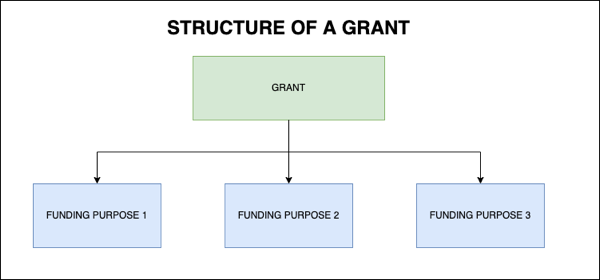
Some examples of Funding Purposes are:
- Business Growth
- Job Creation
- Staff Development
- Working Capital
The full list of Funding Purposes can be obtained through the allFundingPurposes GraphQL query.
The main query you use to return a set of Funding Purpose results is allPurposes
The main query you use to return a single Funding Purpose result is purpose
List of available fields returned for a Grant or Purpose
Grant specific fields
| Field | Type | Description | Example |
|---|---|---|---|
| id | integer | Unique number to identify the grant | 62 |
| url | string | The URL of the grants home page | https://www.federalregister.gov |
| title | string | The title of the grant | Rural Energy for America Program |
| open_or_closed | enum | Is the grant Open, Opening, Closed or Closing | Opening |
| currency | enum | For US grants the currency is always $ | $ |
| total_fund_size | integer | The size of the overall pot of money available across the grant's purposes - unformatted | 50000000 |
| total_fund_size_formatted | string | The size of the overall pot of money available across the grant's purposes - formatted | 5,000,000 |
| provider_1 | string | The main provider of the grant | Rural Business-Cooperative Service |
| provider_2 | string | The secondary provider of the grant | |
| provider_3 | string | The tertiary provider of the grant | |
| funding_types | array | The types of funding provided | Equity Finance |
| purposes | array | The available purposes for the grant. See below for the Purpose specific fields | Business Growth |
| date_added | integer | The timestamp of when the grant was added into our database | 1678705244 |
Funding Purpose specific fields
| Field | Type | Description | Example |
|---|---|---|---|
| id | integer | Unique number to identify the purpose | 204796 |
| grant_id | integer | The id of the grant this purpose is attached to | 62 |
| funding_purpose | string | The type of funding purpose | Business Growth |
| funding_purpose_definition | string | Definition of the funding purpose | Business growth grants fund activities that help you increase sales or find new customers such as market research, marketing, website translation or the cost of launching a product. |
| purpose_title | string | The title of the purpose | Rural Energy for America Program |
| purpose_url | string | The URL of the purpose's home page | https://www.federalregister.gov |
| purpose_application_url | string | The URL of the purpose's application page | https://www.federalregister.gov/documents/2023/03/31/2023-06376/notice-of-solicitation-of-applications-for-the-rural-energy-for-america-program-for-fiscal-years |
| purpose_size_min | integer | The minimum amount available for this purpose - unformatted | 150000 |
| purpose_size_min_formatted | integer | The minimum amount available for this purpose - formatted | 150,000 |
| purpose_size_max | integer | The maximum amount available for this purpose - unformatted | 1000000 |
| purpose_size_max_formatted | integer | The minimum amount available for this purpose - formatted | 1,000,000 |
| purpose_description | string | Description of the purpose | The Rural Business-Cooperative Service (the Agency) is issuing a second Notice of Solicitation of Applications (Notice) under the Rural Energy for America Program (REAP). |
| purpose_dates | string | Contains the relevant date or dates of the purpose. Could also display, for example, Ongoing if there are no relevant dates | Start Date for Applications: 9th January 2023 Application Deadline: 19th March 2023 |
| purpose_region_is_federal | integer | Is this purpose assigned at the federal level. 1 = Yes, 0 = No. | 0 |
| deadline_date | integer | Timestamp, if any, of the purpose's deadline date | 1679184000 |
| date_added | integer | The timestamp of when the purpose was added into our database | 1678705244 |
| regions | array | The regions (or states) this purpose is assigned to. For federal level purposes these will be assigned to the country "United States". | |
| sectors | array | The sectors this purpose applies to. Can also show "All Sectors" if the purpose isn't sector specific | Construction Manufacturing |
| business_types | array | The business types this purposes applies to | Small Business Medium Business |
Results ordering
When using the allPurposes query to fetch results there is a default ordering that takes place to ensure the results returned are the most relevant ones. The default ordering occurs under the following conditions:
- No orderBy specified but a sector argument is specified
- orderBy is '"sector"
Sector ordering
Sector ordering occurs for the following examples:
query {
  allPurposes(sector: "Construction") {
    ...
  }
}
| 1st level ordering | 2nd level ordering | Comment |
|---|---|---|
| 1. exact sector match DESC 2. sectors including the given sector DESC 3. All Sectors DESC |
purpose_size_max DESC | Results only assigned to the given sector(s) are returned first, followed by those results that are assigned to more than 1 sector(s) including the given sector, followed by those sectors assigned to no specific sector (All Sectors). Results within each sector result group are ordered by purpose_size_max DESC |
query {
  allPurposes(
    funding_purpose: "Business Innovation"
    orderBy: "sector"
    ) {
    ...
  }
}
In this example, as no sector was specified but orderBy is "sector", results are returned in sector alphabetical order with those assigned to All Sectors coming after those with an assigned sector.
Location/Region ordering
Location or region ordering is not applicable when using the federal US Grants API.
Documentation Changelog
10th February 2025
- Documented the newly added allPurposes fields to bring them inline with the UK API (business_type_context, funding_amount, funding_amount_context, has_funding_rounds and scheme_manager_type).
10th December 2024
- Documented the new grantsHistory query.
21st November 2024
- Documented the new sub funding purpose field. It's used in the new allSubFundingPurposes query, as an argument and return value for both allGrants and allPurposes.
12th November 2024
- Documented the new withinRangeOnly argument available for the allPurposes query and the PurposesWhereInput object argument to allGrants.
6th September 2024
- Made a note that the UK Grants field purpose_region_is_uk is here renamed to purpose_region_is_us and indicates if a grant is federal or not.
Queries
allBusinessTypes
Description
Returns all the possible Business Types. The main use of this query would be in a UI to present, for example, a drop down list of possible Business Types for the user to select.
Response
Returns [BusinessType!]!
Example
Query
query allBusinessTypes {
  allBusinessTypes {
    business_type
    business_type_context
    funding_amount
    funding_amount_context
  }
}
Response
{
  "data": {
    "allBusinessTypes": [
      {
        "business_type": "Medium Business",
        "business_type_context": "Within their first year of trading",
        "funding_amount": "12.50",
        "funding_amount_context": "Specified %"
      }
    ]
  }
}
allFundingAmounts
Description
Returns all the possible Funding Amount ranges. The main use of this query would be in a UI to present, for example, a drop down list of possible Funding Amount ranges for the user to select.
Response
Returns [FundingAmount!]!
Example
Query
query allFundingAmounts {
  allFundingAmounts {
    id
    text
    min
    max
  }
}
Response
{
  "data": {
    "allFundingAmounts": [
      {"id": 5, "text": "$100,000 - $1,000,000", "min": 987, "max": 987}
    ]
  }
}
allFundingPurposes
Description
Returns all the possible funding purposes. The main use of this query would be in a UI to present, for example, a drop down list of possible funding purposes for the user to select.
Response
Returns [FundingPurpose!]!
Example
Query
query allFundingPurposes {
  allFundingPurposes {
    fundingpurpose
  }
}
Response
{"data": {"allFundingPurposes": [{"fundingpurpose": "Business Innovation"}]}}
allFundingTypes
Description
Returns all the possible Funding Types. The main use of this query would be in a UI to present, for example, a drop down list of possible Funding Types for the user to select.
Response
Returns [FundingType!]!
Example
Query
query allFundingTypes {
  allFundingTypes {
    fundingtype
  }
}
Response
{"data": {"allFundingTypes": [{"fundingtype": "Funding for Project Costs"}]}}
allGrants
Description
Returns all grants matching the given arguments. Note: This refers to grants as opposed to purposes (A grant is made up of 1 or more purposes).
When using the test API key this will always return the same grants regardless of the ID you pass in.
Response
Returns a GrantList
Arguments
| Name | Description |
|---|---|
id - Int
|
The internal ID of the grant |
perPage - Int
|
The number of results to return. This must be less than, or equal, to your subscription API total number of results per request (also returned in the x-api-max-results-per-request response header). If you are on an unlimted subscription then you can set this to a number less than or equal to the default of 25 |
currentPage - Int
|
Which page of results to return. For limited API subscriptions this field has no effect and will always default to 1. |
funding_type - [String]
|
One of the funding types available in the allFundingTypes response e.g. Business Grants, Interest Free Loan, Equity Finance |
orderByDirection - String
|
Results are currently ordered by the date they were added into the database (newest to oldest), we'll be adding more ordering options soon. The orderBy direction, either ASC (default) or DESC. |
purposesWhere - PurposesWhereInput
|
Purpose filters. Allows you to go in at the Grant level but also filter on specific Purpose fields. You can currently filter on the following Purpose fields: funding_purposes, funding_amount_min, funding_amount_max, funding_amount, sector, location, region and business_type. |
Example
Query
query allGrants(
  $id: Int,
  $perPage: Int,
  $currentPage: Int,
  $funding_type: [String],
  $orderByDirection: String,
  $purposesWhere: PurposesWhereInput
) {
  allGrants(
    id: $id,
    perPage: $perPage,
    currentPage: $currentPage,
    funding_type: $funding_type,
    orderByDirection: $orderByDirection,
    purposesWhere: $purposesWhere
  ) {
    totalResults
    totalResultsPerPage
    totalPages
    currentPage
    nextPage
    results {
      ...GrantFragment
    }
  }
}
Variables
{
  "id": 51,
  "perPage": 10,
  "currentPage": 5,
  "funding_type": "Business Grants",
  "orderByDirection": "DESC",
  "purposesWhere": {
    "funding_purposes": ["Business Growth", "Business Innovation"],
    "sub_funding_purposes": ["Job Creation", "Industrial Research"],
    "sector": ["Arts"]
  }
}
Response
{
  "data": {
    "allGrants": {
      "totalResults": 123,
      "totalResultsPerPage": 987,
      "totalPages": 987,
      "currentPage": 123,
      "nextPage": 987,
      "results": [Grant]
    }
  }
}
allLocations
Description
Returns all the possible locations down to city level. You should use this query instead of allRegions if you want a more complete list of US places down to city level. The main use of this query would be in a UI to present, for example, a drop down list of possible locations for the user to select. Federal grants are assigned to the country 'United States'.
Response
Returns [Region!]!
Example
Query
query allLocations {
  allLocations {
    region
    region_type
    display_region
  }
}
Response
{
  "data": {
    "allLocations": [
      {
        "region": "United States",
        "region_type": "country",
        "display_region": "United States"
      }
    ]
  }
}
allPurposes
Response
Returns a PurposeList
Arguments
| Name | Description |
|---|---|
id - Int
|
The ID of a single funding purpose. Equivalent to using the purpose(id: Int!) query. |
funding_purposes - [String]
|
One or more of the funding purposes available in the allFundingPurposes response e.g. ["Buildings and Renovation", "Business Innovation"]. Choices defined in the funding_purposes field will override any choices made in the funding_purpose field (which will be deprectaed in the future). |
funding_purpose - String
|
Only one of the funding purposes available in the allFundingPurposes response e.g. Business Innovation. This field wil be deprected in the future. You should use the funding_purposes field, an array that allows one or more funding_purpopes to be requested. |
sub_funding_purposes - [String]
|
One or more of the sub funding purposes available in the allSubFundingPurposes response e.g. ["Industrial Research", "Staff Development"]. |
region - String
|
The US state. This is called Region to maintain code compatibility with the UK API |
location - String
|
Any US location (country, state, city) e.g. USA, California, San Diego |
locationOnly - Int
|
If set to 1 then only grants that match the given location exactly will be returned, if 0 then those grants that also cover the given location will also be returned |
sector - [String]
|
One or more of the sectors available in the allSectors response e.g. Construction, Manufacturing |
sectorOnly - Int
|
If set to 1 then only grants that match the given sector exactly will be returned, if 0 then those grants that apply to All Sectors will also be returned |
business_type - String
|
One of the business types available in the allBusinessTypes response e.g. Large Business, Medium Business, Start-ups |
funding_amount - Int
|
One of the ID numbers available in the allFundingAmounts response that aligns with a range of funding amounts e.g. 5 - which represents the range £100,000 - £149,999. You can define your own minimum, maximum or both (your own range) by using the funding_amount_min and funding_amount_max fields instead. |
funding_amount_min - Int
|
An integer representing the minimum funding amount - this, along with funding_amount_max, is an alternative to using the pre-defined funding ranges in the funding_amount field. If either funding_amount_min or funding_amount_max are specified then the funding_amount field will be ignored if that is also specified. You can specify just a minimum, just a maximum, or both to define your own range. |
funding_amount_max - Int
|
An integer representing the minimum funding amount - this, along with funding_amount_min, is an alternative to using the pre-defined funding ranges in the funding_amount field. If either funding_amount_min or funding_amount_max are specified then the funding_amount field will be ignored if that is also specified. You can specify just a minimum, just a maximum, or both to define your own range. |
withinRangeOnly - Int
|
If funding_amount_min and/or funding_amount_max is specified and this value is set to 1 then purposes without a defined purpose_size_min AND purpose_size_max (both values are NULL or unspecified) will not be returned. Only purposes that have either a defined purposes_size_min, a defined purposes_size_max or both defined, that fall within the defied range will be returned. |
funding_type - [String]
|
One of the funding types available in the allFundingTypes response e.g. Business Grants, Interest Free Loan, Equity Finance |
open_or_closed - [String]
|
Only return those schemes that are in the given open_or_closed status i.e. Open, Opening or Closed |
orderBy - String
|
How to order the results. It defaults to ordering by the purpose_size_max (the maximum amount available) DESC. You can also order by deadline_date, date_added, sector, region, location, funding_purpose or sub_funding_purpose |
orderByDirection - String
|
The orderBy direction, either ASC (default) or DESC |
perPage - Int
|
The number of results to return. This must be less than, or equal, to your subscription API total number of results per request (also returned in the x-api-max-results-per-request response header). If you are on an unlimted subscription then you can set this to a number less than or equal to the default of 25 |
currentPage - Int
|
Which page of results to return. For limited API subscriptions this field has no effect and will always default to 1. |
startDate - Int
|
A Unix time stamp that when used in conjunction with endDate will only return grants added to the database within the given time frame |
endDate - Int
|
A Unix timestamp that when used in conjunction with startDate will only return grants added to the database within the given time frame |
lastWeek - Boolean
|
If set to true only grants added to the database in the last week, relative to the NOW() time, will be returned |
deadlineStartDate - Int
|
A Unix timestamp that when used in conjunction with deadlineEndDate will only return grants with a deadline_date between deadlineStartDate and deadlineEndDate. Cannot be used in conjunction with startDate and endDate |
deadlineEndDate - Int
|
A Unix timestamp that when used in conjunction with deadlineStartDate will only return grants with a deadline_date between deadlineStartDate and deadlineEndDate. Cannot be used in conjunction with startDate and endDate |
Example
Query
query allPurposes(
  $id: Int,
  $funding_purposes: [String],
  $funding_purpose: String,
  $sub_funding_purposes: [String],
  $region: String,
  $location: String,
  $locationOnly: Int,
  $sector: [String],
  $sectorOnly: Int,
  $business_type: String,
  $funding_amount: Int,
  $funding_amount_min: Int,
  $funding_amount_max: Int,
  $withinRangeOnly: Int,
  $funding_type: [String],
  $open_or_closed: [String],
  $orderBy: String,
  $orderByDirection: String,
  $perPage: Int,
  $currentPage: Int,
  $startDate: Int,
  $endDate: Int,
  $lastWeek: Boolean,
  $deadlineStartDate: Int,
  $deadlineEndDate: Int
) {
  allPurposes(
    id: $id,
    funding_purposes: $funding_purposes,
    funding_purpose: $funding_purpose,
    sub_funding_purposes: $sub_funding_purposes,
    region: $region,
    location: $location,
    locationOnly: $locationOnly,
    sector: $sector,
    sectorOnly: $sectorOnly,
    business_type: $business_type,
    funding_amount: $funding_amount,
    funding_amount_min: $funding_amount_min,
    funding_amount_max: $funding_amount_max,
    withinRangeOnly: $withinRangeOnly,
    funding_type: $funding_type,
    open_or_closed: $open_or_closed,
    orderBy: $orderBy,
    orderByDirection: $orderByDirection,
    perPage: $perPage,
    currentPage: $currentPage,
    startDate: $startDate,
    endDate: $endDate,
    lastWeek: $lastWeek,
    deadlineStartDate: $deadlineStartDate,
    deadlineEndDate: $deadlineEndDate
  ) {
    totalResults
    totalResultsPerPage
    totalPages
    currentPage
    nextPage
    results {
      ...PurposeFragment
    }
  }
}
Variables
{
  "id": 28856,
  "funding_purposes": ["Business Innovation", "Research and Development"],
  "funding_purpose": "Research and Development",
  "sub_funding_purposes": ["Job Creation", "Industrial Research"],
  "region": "California",
  "location": "United States",
  "locationOnly": 1,
  "sector": "Agriculture",
  "sectorOnly": 1,
  "business_type": "Medium Business",
  "funding_amount": 5,
  "funding_amount_min": 5000,
  "funding_amount_max": 19000,
  "withinRangeOnly": 1,
  "funding_type": "Business Grants",
  "open_or_closed": "Opening",
  "orderBy": "deadline_date",
  "orderByDirection": "DESC",
  "perPage": 10,
  "currentPage": 5,
  "startDate": 1698815564,
  "endDate": 1701407564,
  "lastWeek": "false",
  "deadlineStartDate": 1698815564,
  "deadlineEndDate": 1701407564
}
Response
{
  "data": {
    "allPurposes": {
      "totalResults": 355,
      "totalResultsPerPage": 987,
      "totalPages": 35,
      "currentPage": 4,
      "nextPage": 5,
      "results": ["An array of Purpose objects"]
    }
  }
}
allRegions
Description
Returns all the possible US regions/states. For a full list of states and cities use the allLocations query instead.
Response
Returns [Region!]!
Example
Query
query allRegions {
  allRegions {
    region
    region_type
    display_region
  }
}
Response
{
  "data": {
    "allRegions": [
      {
        "region": "United States",
        "region_type": "country",
        "display_region": "United States"
      }
    ]
  }
}
allSectors
Description
Returns the full list of available sectors. Each sector has a title and also a higher level 'top level' grouping. For example the Software sector has a top_level grouping of Information & Communication. The sector_or_top_level argument allows you to return either the list of sectors or the list of top level groupings, it defaults to the list of sectors.
Response
Returns [Sector!]!
Arguments
| Name | Description |
|---|---|
sector_or_top_level - String
|
Either the string 'sector' or 'top_level' depending on if you want the list of sectors or top level groupings returned. Defaults to 'sector'. |
Example
Query
query allSectors($sector_or_top_level: String) {
  allSectors(sector_or_top_level: $sector_or_top_level) {
    sector
    top_level
  }
}
Variables
{"sector_or_top_level": "sector"}
Response
{
  "data": {
    "allSectors": [
      {"sector": "Advanced Manufacturing", "top_level": "Manufacturing"}
    ]
  }
}
allSubFundingPurposes
Description
Returns all the possible sub funding purposes. The main use of this query would be in a UI to present, for example, a drop down list of possible sub funding purposes for the user to select.
Response
Returns [SubFundingPurpose!]!
Example
Query
query allSubFundingPurposes {
  allSubFundingPurposes {
    subfundingpurpose
    fundingpurpose
  }
}
Response
{
  "data": {
    "allSubFundingPurposes": [
      {
        "subfundingpurpose": "Research and Development",
        "fundingpurpose": "Business Innovation"
      }
    ]
  }
}
grant
Description
Returns a single grant if an id is passed otherwise up to 25 grants if a title is passed. Note: This refers to grants as opposed to purposes (A grant is made up of 1 or more purposes).
When using the test API key this will always return the same grant regardless of the ID you pass in.
Response
Returns [Grant!]!
Arguments
| Name | Description |
|---|---|
id - Int
|
The internal ID of the grant |
title - String
|
The title of the grant. This is used to perform a wildcard search of grant titles. For example, if you pass 'energy' as the grant title then a search for '%energy%' will be performed. |
limit - Int
|
When performing a title search this defines how many results to return. It defaults to, and has a maximum of, 25 grant results. |
Example
Query
query grant(
  $id: Int,
  $title: String,
  $limit: Int
) {
  grant(
    id: $id,
    title: $title,
    limit: $limit
  ) {
    id
    opportunity_id
    url
    title
    open_or_closed
    currency
    total_fund_size
    total_fund_size_formatted
    provider_1
    provider_2
    provider_3
    provider_4
    funding_types {
      ...FundingTypeFragment
    }
    purposes {
      ...PurposeFragment
    }
    date_added
    last_checked
    has_funding_rounds
    scheme_manager_type
  }
}
Variables
{"id": 987, "title": "abc123", "limit": 123}
Response
{
  "data": {
    "grant": [
      {
        "id": "405",
        "opportunity_id": "348100",
        "url": "https://www.rd.usda.gov/hbiip",
        "title": "Higher Blends Infrastructure Incentive Program (HBIIP)",
        "open_or_closed": "open",
        "currency": "$",
        "total_fund_size": "500000000",
        "total_fund_size_formatted": "500,000,000",
        "provider_1": "Rural Business-Cooperative Service",
        "provider_2": "",
        "provider_3": "",
        "provider_4": "",
        "funding_types": [FundingType],
        "purposes": [Purpose],
        "date_added": "1716206388",
        "last_checked": 987,
        "has_funding_rounds": 123,
        "scheme_manager_type": "abc123"
      }
    ]
  }
}
grantsHistory
Description
Returns the grants history for the given date(s). If no startDate or endDate is passed in then the current day is used by default. If a single startDate is passed in then all history entries for the previous 24 hours relative to that date are returned. If both a startDate and an endDate are passed in the all history entries between those two dates (inclusive) are returned. A grant history entry shows any grant that changed on the given date where a change can be New (a newly added grant), Removed (it's been removed from the database), Re-added (it's been added back into the database after being removed) or Updated (1 or more of it's fields have been updated)
Response
Returns a History!
Example
Query
query grantsHistory(
  $startDate: DateInput,
  $endDate: DateInput
) {
  grantsHistory(
    startDate: $startDate,
    endDate: $endDate
  ) {
    historyStartDate
    historyEndDate
    runStatus
    totalChanges
    history {
      ...GrantHistoryFragment
    }
  }
}
Variables
{"startDate": "2024-11-24", "endDate": "2024-11-28"}
Response
{
  "data": {
    "grantsHistory": {
      "historyStartDate": "2024-11-24",
      "historyEndDate": "2024-11-28",
      "runStatus": "Complete",
      "totalChanges": 6,
      "history": [GrantHistory]
    }
  }
}
overallTotals
Description
Returns a response containing the overall totals of the database content. E.g. the total number of grants in the database, the total amount of funding available across the total grants, how many grants were added to the database in the last month.
Response
Returns an OverallTotals!
Example
Query
query overallTotals {
  overallTotals {
    total_schemes
    total_available_formatted
    total_funding_purposes
    total_added_last_month
  }
}
Response
{
  "data": {
    "overallTotals": {
      "total_schemes": "2613",
      "total_available_formatted": "£4.3bn",
      "total_funding_purposes": "10",
      "total_added_last_month": "214"
    }
  }
}
purpose
Description
Returns a single purpose as opposed to a frant. Note: A grant is made up of 1 or more purposes and a purpose is what a end-user would apply for. In most cases you would be presenting purpose(s) to an end-user rather than a grant.
When using the test API key this will always return the same purpose regardless of the ID you pass in.
Example
Query
query purpose($id: Int!) {
  purpose(id: $id) {
    id
    grant_id
    funding_purpose
    funding_purpose_definition
    sub_funding_purpose
    sub_funding_purpose_definition
    purpose_title
    purpose_url
    purpose_application_url
    purpose_size_min
    purpose_size_min_formatted
    purpose_size_max
    purpose_size_max_formatted
    purpose_description
    purpose_dates
    purpose_region_is_federal
    deadline_date
    date_added
    grant {
      ...GrantFragment
    }
    sectors {
      ...SectorFragment
    }
    regions {
      ...RegionFragment
    }
    business_types {
      ...BusinessTypeFragment
    }
  }
}
Variables
{"id": 123}
Response
{
  "data": {
    "purpose": {
      "id": 123,
      "grant_id": 123,
      "funding_purpose": "xyz789",
      "funding_purpose_definition": "xyz789",
      "sub_funding_purpose": "abc123",
      "sub_funding_purpose_definition": "abc123",
      "purpose_title": "xyz789",
      "purpose_url": "xyz789",
      "purpose_application_url": "xyz789",
      "purpose_size_min": 123,
      "purpose_size_min_formatted": "abc123",
      "purpose_size_max": "abc123",
      "purpose_size_max_formatted": "xyz789",
      "purpose_description": "abc123",
      "purpose_dates": "xyz789",
      "purpose_region_is_federal": 123,
      "deadline_date": 987,
      "date_added": 123,
      "grant": Grant,
      "sectors": [Sector],
      "regions": [Region],
      "business_types": [BusinessType]
    }
  }
}
Types
Boolean
Description
The Boolean scalar type represents true or false.
Example
true
BusinessType
Description
The type of business. For example, Small Business, Medium Business, Large Business, Academic.
Fields
| Field Name | Description |
|---|---|
business_type - String!
|
The type of business |
business_type_context - String
|
The context for the business_type. For example, if the business_type is 'Start-ups' then the context could be 'Within their first year of trading'. |
funding_amount - String
|
Any specific funding amount percentage related to the business type |
funding_amount_context - String
|
The context of the funding_amount. For example, if the funding_amount is'55' then the context could be 'Specified %' meaning the business type can get 55% of the money. The possible values are 'Not Specified','Specified %','Up to','Less than' or blank if there are no specific contexts. |
Example
{
  "business_type": "Medium Business",
  "business_type_context": "Within their first year of trading",
  "funding_amount": "12.50",
  "funding_amount_context": "Specified %"
}
DateInput
Description
A date in YYYY-MM-DD format, for example 2024-11-25
Example
"2024-11-25"
FundingAmount
Description
A funding amount represented by an id and a textual representation of the range. For example, id:2 text:$100,000 - $999,999
Example
{"id": 5, "text": "$100,000 - $1,000,000", "min": 123, "max": 123}
FundingPurpose
Description
A funding purpose is the purpose the available money can be used for.
Fields
| Field Name | Description |
|---|---|
fundingpurpose - String!
|
The funding purpose. For example, Business Growth, Business Innovation, Starting a Business |
Example
{"fundingpurpose": "Business Innovation"}
FundingType
Description
The type of funding being offered. For example, Interest Free Loan, Funding for Project Costs, Equity Finance, Business Grants.
Fields
| Field Name | Description |
|---|---|
fundingtype - String!
|
A string containing the funding type |
Example
{"fundingtype": "Funding for Project Costs"}
Grant
Description
The Grant type represents a single grant (as opposed to a purpose - grants are broken down into 1 or more purposes).
Fields
| Field Name | Description |
|---|---|
id - Int!
|
The internal ID number of the grant |
opportunity_id - Int
|
The grants.gov grant Opportunity ID. |
url - String!
|
The URL of the grant page. |
title - String!
|
The title of the grant |
open_or_closed - String!
|
The status of the grant - can be open, opening or closing. |
currency - String
|
The currency of the all the various funding amount fields in both the grant and it's purposes. For US Grants this will always be $ |
total_fund_size - String
|
The total amount of money available. This may be split across the grants various purposes. For example, 10000000 |
total_fund_size_formatted - String
|
The total_fund_size above number formatted. For example, 10,000,000 |
provider_1 - String!
|
The main provider of this grant. For example, Fish and Wildlife Service |
provider_2 - String
|
If a grant has multiple providers the providers _2, _3 and _4 below list those. |
provider_3 - String
|
|
provider_4 - String
|
|
funding_types - [FundingType]
|
A list of the FundingTypes available. For example, Business Grants, Interest Free Loan. |
purposes - [Purpose]
|
A list of 1 or more Purposes (click here to view the Purpose definition). A user applies for the money at the purpose level. |
date_added - Int!
|
A unix timestamp of the date the grant was added to the grants database |
last_checked - Int
|
A unix timestamp of the date the grant was last checked |
has_funding_rounds - Int!
|
Does this grant have funding rounds? 1=Yes, 0=No |
scheme_manager_type - String!
|
The Scheme Manager type. For example, Government Department. |
Example
{
  "id": "405",
  "opportunity_id": "348100",
  "url": "https://www.rd.usda.gov/hbiip",
  "title": "Higher Blends Infrastructure Incentive Program (HBIIP)",
  "open_or_closed": "open",
  "currency": "$",
  "total_fund_size": "500000000",
  "total_fund_size_formatted": "500,000,000",
  "provider_1": "Rural Business-Cooperative Service",
  "provider_2": "",
  "provider_3": "",
  "provider_4": "",
  "funding_types": [FundingType],
  "purposes": [Purpose],
  "date_added": "1716206388",
  "last_checked": 987,
  "has_funding_rounds": 123,
  "scheme_manager_type": "xyz789"
}
GrantHistory
Description
Represents a grant history entry. The change_type can be:
- New - The grant has been newly added and has never been seen before
- Removed - The grant has been removed from the database for some reason E.g. a broken link or Application deadline has passed
- Re-added - The grant has been re-added back into the database after being removed at some point
- Updated - One or more of the grants fields has been updated
Example
{"grant_id": 12899, "change_type": "Updated"}
GrantList
History
Fields
| Field Name | Description |
|---|---|
historyStartDate - String!
|
The start date of the history check |
historyEndDate - String!
|
The end date of the history check |
runStatus - String!
|
The status of overnight job that checks for grant changes. Can be 'Complete' or 'Not yet run'. |
totalChanges - Int!
|
The total number of grants that had a change in the given date range or day. |
history - [GrantHistory!]!
|
An array of the grants that had a change. |
Example
{
  "historyStartDate": "2024-11-24",
  "historyEndDate": "2024-11-28",
  "runStatus": "Complete",
  "totalChanges": 6,
  "history": [GrantHistory]
}
Int
Description
The Int scalar type represents non-fractional signed whole numeric values. Int can represent values between -(2^31) and 2^31 - 1.
Example
123
OverallTotals
Description
Returns the overall database totals
Fields
| Field Name | Description |
|---|---|
total_schemes - Int!
|
Total number of Schemes in the result set |
total_available_formatted - String!
|
The total amount of funding available as a formatted string |
total_funding_purposes - Int!
|
The total number of funding purposes |
total_added_last_month - Int!
|
The total number of schemes added in the last month |
Example
{
  "total_schemes": "2613",
  "total_available_formatted": "£4.3bn",
  "total_funding_purposes": "10",
  "total_added_last_month": "214"
}
Purpose
Fields
| Field Name | Description |
|---|---|
id - Int!
|
|
grant_id - Int!
|
|
funding_purpose - String!
|
|
funding_purpose_definition - String
|
|
sub_funding_purpose - String!
|
|
sub_funding_purpose_definition - String
|
|
purpose_title - String!
|
|
purpose_url - String
|
|
purpose_application_url - String
|
|
purpose_size_min - Int
|
|
purpose_size_min_formatted - String
|
|
purpose_size_max - String
|
|
purpose_size_max_formatted - String
|
|
purpose_description - String
|
|
purpose_dates - String
|
|
purpose_region_is_federal - Int
|
|
deadline_date - Int
|
|
date_added - Int
|
|
grant - Grant!
|
|
sectors - [Sector!]!
|
|
regions - [Region!]!
|
|
business_types - [BusinessType!]!
|
Example
{
  "id": 987,
  "grant_id": 987,
  "funding_purpose": "abc123",
  "funding_purpose_definition": "xyz789",
  "sub_funding_purpose": "xyz789",
  "sub_funding_purpose_definition": "abc123",
  "purpose_title": "abc123",
  "purpose_url": "xyz789",
  "purpose_application_url": "abc123",
  "purpose_size_min": 987,
  "purpose_size_min_formatted": "xyz789",
  "purpose_size_max": "xyz789",
  "purpose_size_max_formatted": "abc123",
  "purpose_description": "xyz789",
  "purpose_dates": "abc123",
  "purpose_region_is_federal": 987,
  "deadline_date": 123,
  "date_added": 987,
  "grant": Grant,
  "sectors": [Sector],
  "regions": [Region],
  "business_types": [BusinessType]
}
PurposeList
Example
{
  "totalResults": 355,
  "totalResultsPerPage": 987,
  "totalPages": 35,
  "currentPage": 4,
  "nextPage": 5,
  "results": ["An array of Purpose objects"]
}
PurposesWhereInput
Fields
| Input Field | Description |
|---|---|
funding_purposes - [String]
|
Only return those Grants that have at least one Purpose with the given funding purpose(s) |
sub_funding_purposes - [String]
|
Only return those Grants that have at least one Purpose with the given sub funding purpose(s) |
funding_type - [String]
|
One of the funding types available in the allFundingTypes response e.g. Business Grants, Interest Free Loan, Equity Finance |
funding_amount_min - Int
|
An integer representing the minimum funding amount - this, along with funding_amount_max, is an alternative to using the pre-defined funding ranges in the funding_amount field. If either funding_amount_min or funding_amount_max are specified then the funding_amount field will be ignored if that is also specified. You can specify just a minimum, just a maximum, or both to define your own range. |
funding_amount_max - Int
|
An integer representing the minimum funding amount - this, along with funding_amount_min, is an alternative to using the pre-defined funding ranges in the funding_amount field. If either funding_amount_min or funding_amount_max are specified then the funding_amount field will be ignored if that is also specified. You can specify just a minimum, just a maximum, or both to define your own range. |
withinRangeOnly - Int
|
If funding_amount_min and/or funding_amount_max is specified and this value is set to 1 then purposes without a defined purpose_size_min AND purpose_size_max (both values are NULL or unspecified) will not be returned. Only purposes that have either a defined purposes_size_min, a defined purposes_size_max or both defined, that fall within the defied range will be returned. |
funding_amount - Int
|
One of the ID numbers available in the allFundingAmounts response that aligns with a range of funding amounts e.g. 5 - which represents the range £100,000 - £149,999. You can define your own minimum, maximum or both (your own range) by using the funding_amount_min and funding_amount_max fields instead. |
sector - [String]
|
One or more of the sectors available in the allSectors response e.g. Construction, Manufacturing |
location - String
|
Any UK location (country, region, city, town) e.g. England, North West, Glasgow, Dudley |
region - String
|
One of the regions available in the allRegions response e.g. North West, Scotland, Wales, South East |
business_type - String
|
One of the business types available in the allBusinessTypes response e.g. Academic, Large Business, Medium Business, Start-ups |
locationOnly - Int
|
If set to 1 then only grants that match the given location exactly will be returned, if 0 then those grants that also cover the given location will also be returned |
Example
{
  "funding_purposes": ["Business Innovation", "Business Growth"],
  "sub_funding_purposes": ["Job Creation", "Industrial Research"],
  "funding_type": ["Business Grants"],
  "funding_amount_min": 50000,
  "funding_amount_max": 200000,
  "withinRangeOnly": 1,
  "funding_amount": 4,
  "sector": ["Arts", "Business and Commerce"],
  "location": "Los Angeles",
  "region": "California",
  "business_type": "Small Business",
  "locationOnly": 1
}
Region
Description
Returns the list of US states. This is called Region to maintain code compatibility with the UK API.
Example
{
  "region": "United States",
  "region_type": "country",
  "display_region": "United States"
}
Sector
Description
Returns a single Sector. Each Sector has a title and a higher level 'top level' assignment. For example, the 'Food' sector is assigned to the top_level grouping of 'Manufacturing'.
Example
{"sector": "Advanced Manufacturing", "top_level": "Manufacturing"}
String
Description
The String scalar type represents textual data, represented as UTF-8 character sequences. The String type is most often used by GraphQL to represent free-form human-readable text.
Example
"xyz789"
SubFundingPurpose
Description
A sub funding purpose is a more fine-grained funding purpose the available money can be used for.
Example
{
  "subfundingpurpose": "Research and Development",
  "fundingpurpose": "Business Innovation"
}